
Detection
Evaluating bounding-box detection with `DetectionScorer` — metrics, thresholds, and the bbox editor hand-off.
Detection is Evaluar's most-exercised modality. It uses DetectionScorer (src/evaluar/scoring/detection.py:37) plus the bbox editor for visual inspection.
A minimal detection suite
from evaluar.api import detection, suite

def my_detector(image_url: str) -> dict:
    return {"prediction": [...]}

def build_suite(sample_ids=None, config=None):
    pipeline = (
        detection("my_detector")
        .callable(my_detector)
        .inputs({"sample_001": {"image_url": "..."}})
        .ground_truth({"sample_001": {"objects": [
            {"label": "table", "bbox": [100, 100, 400, 300]},
        ]}})
        .default_mapping()
        .build()
    )
    s = suite(sample_ids=sample_ids or ["sample_001"], suite_name="detection_eval")
    s.add_pipeline("my_detector", pipeline)
    return s
detection("model_id") is a convenience wrapper for PipelineBuilder.for_task("detection", "model_id"). It installs DetectionScorer with default thresholds; everything else is the standard builder chain.
Canonical prediction shape
After normalization, predictions must conform to the detection schema (src/evaluar/schemas/predictions.py):
{
    "objects": [
        {"label": "table", "bbox": [x_min, y_min, x_max, y_max], "score": 0.92, "class_id": 0},
        ...
    ]
}
label is required; score is required for AP-style metrics; class_id is optional.
Ground truth shape
Detection ground truth uses a similar shape, without the score:
{
    "objects": [
        {"label": "table", "bbox": [x_min, y_min, x_max, y_max]},
        ...
    ]
}
Typed constructors are available in evaluar.schemas:
from evaluar.schemas import GTDetection, GTDetectedObject

gt = GTDetection(
    sample_id="sample_001",
    objects=[GTDetectedObject(label="table", bbox=[100, 100, 400, 300])],
)
Metrics
The detection scorer composes the metric functions from src/evaluar/metrics/__init__.py:
| Metric | Function |
|---|---|
| Mean Average Precision (averaged IoU thresholds) | compute_map, compute_dataset_map |
| AP at a single IoU | compute_ap, compute_dataset_ap (e.g. map_50) |
| Confusion matrix | compute_confusion_matrix |
| Detection match table | match_detections |
| IoU helpers | compute_iou, compute_iou_matrix |
| Aggregate stats | compute_detection_metrics, DetectionMetrics |
Per-metric thresholds are declared on DetectionScorerConfig. Defaults:
thresholds = {
    "map":    MetricThreshold(pass_floor=0.70, warn_floor=0.50),
    "map_50": MetricThreshold(pass_floor=0.80, warn_floor=0.60),
}
Tuning thresholds in YAML
thresholds:
  map_50:
    pass_floor: 0.7
    warn_floor: 0.6
  precision:
    pass_floor: 0.85
    warn_floor: 0.65
  recall:
    pass_floor: 0.7
    warn_floor: 0.6
gated_metrics:
  - map_50
  - precision
  - recall
per_class_gated: true
This is the literal shape used in evaluar/configs/floor_plan_model.yaml.
Inspecting failures visually
Detection failures are almost always faster to diagnose visually than numerically. After a run, open it in the TUI, jump into the failure inspector with i, then press o to launch the bbox editor in overlay mode.
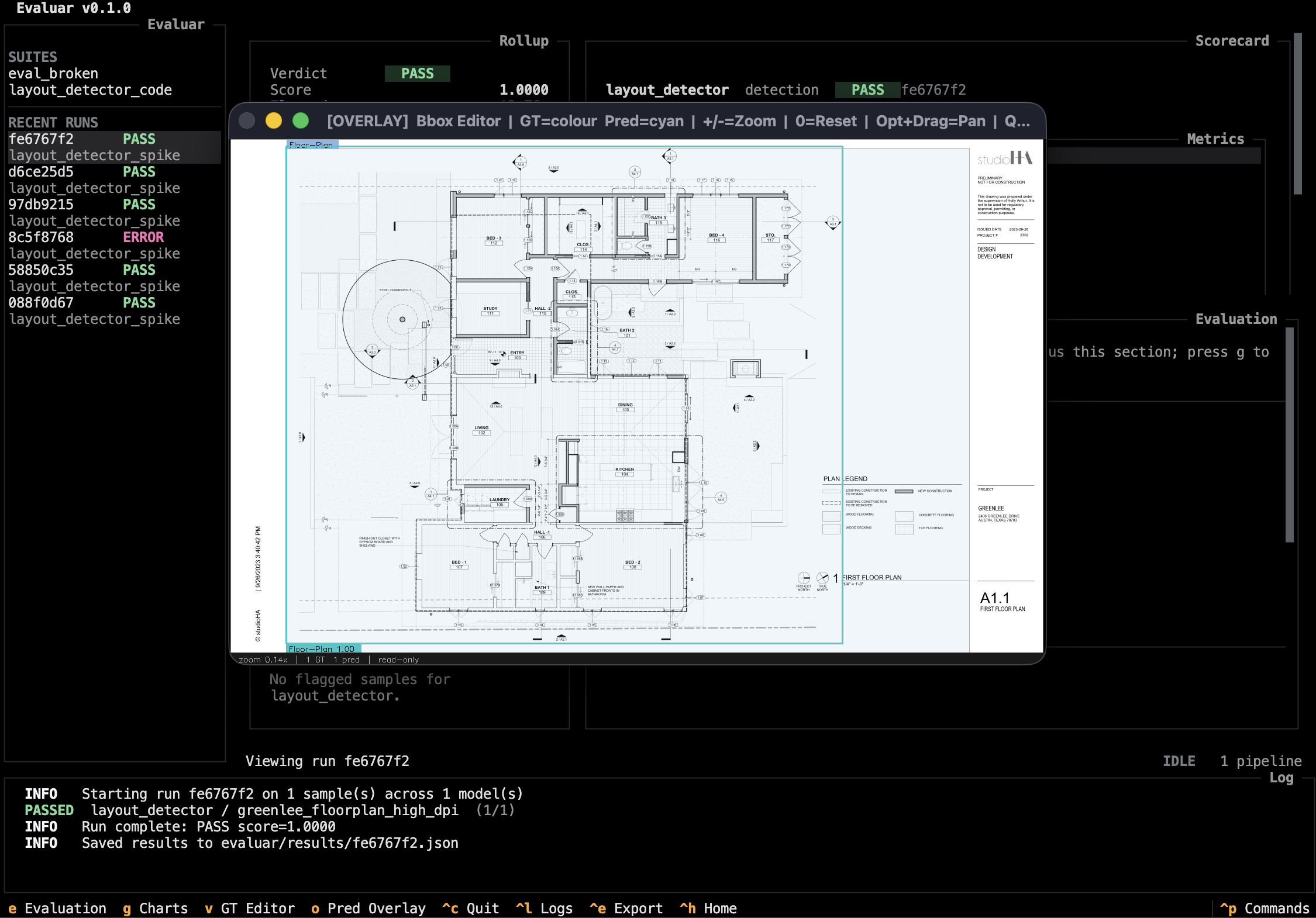
If a sample's ground truth is wrong, press v instead — same window, edit mode. See Bbox editor for the complete keymap and the architectural reason it's a subprocess.